
Our Proxy DLL® app allows your .NET application to invoke a normal class library (DLL) on a remote computer as if the DLL is on your computer.
No extra coding is needed:
This way, your app doesn't even know that what it is invoking is not the original DLL, because the proxy DLL behaves as the original DLL.

The Proxy DLL® app converts the received byte array to a JSON string, then parses the JSON to get the method invocation details, and uses it to invoke the corresponding method in the original DLL on behalf of the proxy DLL.
If the invocation details doesn't match any method on the original DLL, it throws an exception which pops out of the proxy DLL method on the proxy-DLL computer.
Whatever data the original DLL method returns, the RPC service returns to the RPC consumer via the server. The proxy DLL method returns to the app. The round trip happens in 100 ms.
See also: What Claude AI thinks of us.

To give you peace of mind, all of our software products are signed with an EV (Extended Validation) Code Signing Certificate issued by Sectigo, one of the Certificate Authorities trusted by Microsoft Windows. Sectigo put us through a stringent and lengthy process to verify Front Edge Software's legal identity, registered address, and right to operate under that name.
This signature on our products holds us accountable for every binary we ship, and guarantees that no one else can distribute fake apps claiming to be ours.
See details of EV code signing.
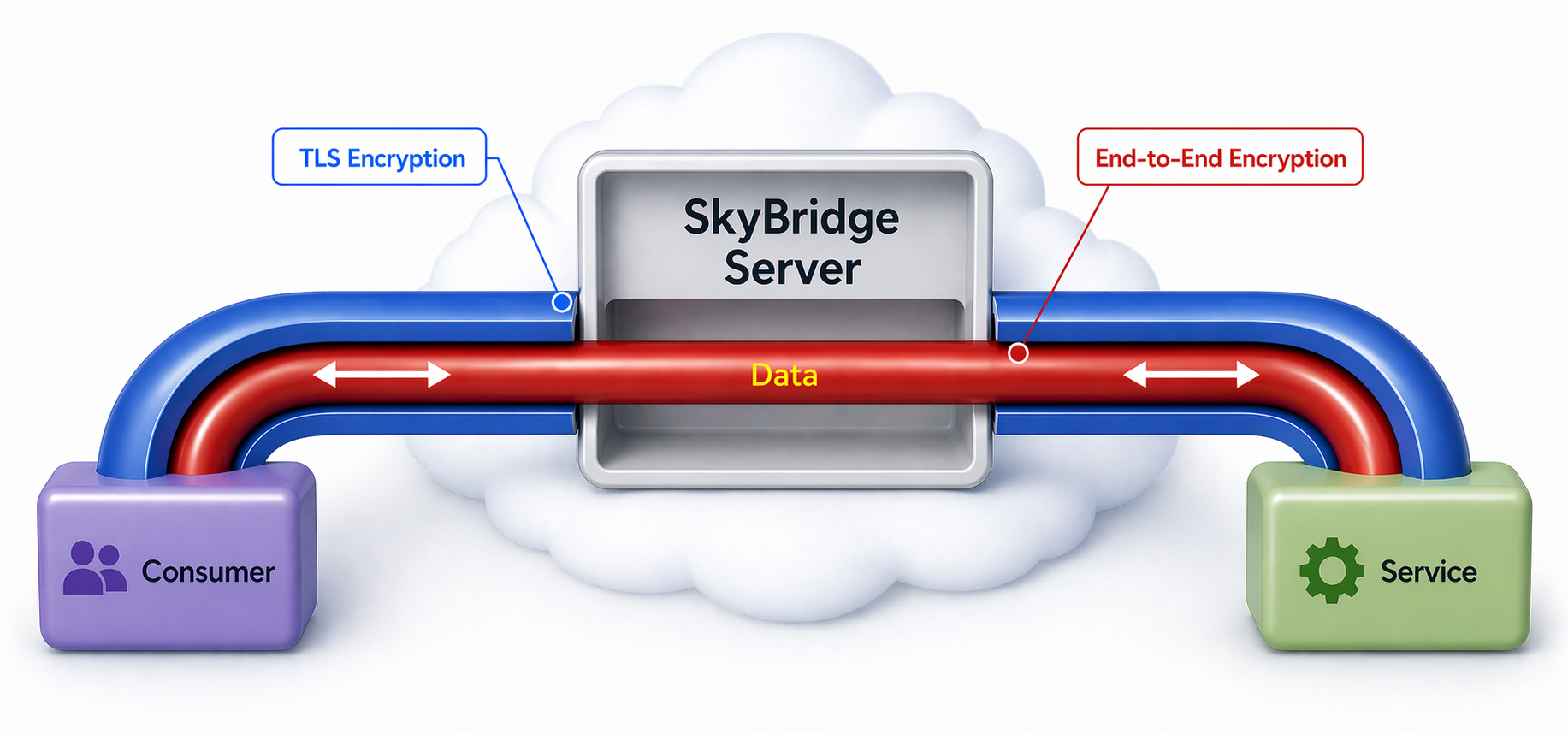
As you can see in the data flow chart, the invocation data that is sent to the original DLL computer must match a method on the original DLL by signature, otherwise an exception will be thrown. So, even if a malicious party managed to alter the invocation data despite of the double encryption in data transit, it cannot make the proxy DLL remote invocations listener do anything except calling a method on the original DLL.
Therefore, Cross-Site Scripting (XSS) is impossible. The original DLL is the sandbox that an attacker can never get out of.
Following is the "AddNewTeam" function in an original DLL (in the example project). It opens the database context, adds a new team, saves the change, and returns the new team as a DTO.
public static DTOs.Team AddNewTeam(string teamName)
{
    using (var ctx = Utilities.GetDataContext())
    {
        var team = new Team
        {
            TeamId = Guid.NewGuid(),
            Name = teamName,
        };

        ctx.Teams.Add(team);
        ctx.SaveChanges();
        return team.GetDto();
    }
}
Following is the code in the "AddNewTeam" function in the generated proxy DLL:
public static FrontEdge.ProxyDll.Examples.HumanResource.DTOs.Team AddNewTeam(System.String teamName)
{
    var functionCall = new FuncCall
    {
        ClassType = "FrontEdge.ProxyDll.Examples.HumanResource.DataAccess",
        FunctionName = "AddNewTeam",
    };

    var settings = new JsonSerializerSettings { TypeNameHandling = TypeNameHandling.All, TypeNameAssemblyFormatHandling = TypeNameAssemblyFormatHandling.Full, ContractResolver = new FrontEdge.SkyBridge.ProxyDllCompanion.ConstructorBypassContractResolver() };
    functionCall.FunctionParameters = new FuncCallParam[1];

    functionCall.FunctionParameters[0] = new FuncCallParam
    {
        Name = "teamName",
        Type = "System.String",
        ParamValueJsonString = JsonConvert.SerializeObject(teamName, settings),
    };

    string functionCallJson = JsonConvert.SerializeObject(functionCall);
    byte[] functionCallBytes = Encoding.UTF8.GetBytes(functionCallJson);

    try
    {
        byte[] responseBytes = Task.Run(() => __ApiContainer.Api.InvokeService(Guid.Parse(__ApiContainer.OrigDllRPCServiceId), functionCallBytes)).Result;

        string responseJson = Encoding.UTF8.GetString(responseBytes);
        FuncCallResp response = JsonConvert.DeserializeObject<FuncCallResp>(responseJson);
        return (FrontEdge.ProxyDll.Examples.HumanResource.DTOs.Team)JsonConvert.DeserializeObject(response.ReturnedValueJsonString, settings);
    }
    catch (Exception ex)
    {
        var __remoteEx = FrontEdge.SkyBridge.ProxyDllCompanion.RemoteOrigDllException.TryFrom(ex);
        if (__remoteEx != null)
            throw __remoteEx;
        var __rootEx = ex is AggregateException __agg && __agg.InnerException != null ? __agg.InnerException : ex;
        System.Runtime.ExceptionServices.ExceptionDispatchInfo.Capture(__rootEx).Throw();
        throw; // unreachable
    }
}


Proxy DLL updates are deliberate. The original-DLL computer generates and publishes versions; each proxy-DLL computer can then refresh the version list and download the version it wants. Both sides can keep source-code edits under control instead of treating generated code as a black box.
If the original DLL is upreved after you edited the proxy source, SkyBridge compares the previous generated source, your edited source, and the newly generated source. It can try to merge your edits into the new version. If the merge is not safe, you can either keep the old edited code and leave hosting paused, or discard the old edits and accept the newly generated proxy source.
The same merge workflow exists on the proxy-DLL computer. There the "base" is the source code downloaded from the server, because the proxy-DLL computer does not have the original DLL. Local edits can be merged into a newer downloaded version before compiling.
This keeps updates under the developer's control. A public interface change can break code that references the proxy DLL, so SkyBridge makes the new version visible without silently replacing a DLL that another project is using.
Changes that don't touch the public interface — for example, modifying the body of a method without changing its signature — don't require a new proxy DLL. The same proxy DLL keeps working, and the new behaviour takes effect immediately on the original-DLL computer.
You are an instrument manufacturer with instruments being used in customer labs. Occasionally you need to remotely initiate the self-diagnosis process on the instruments and get back the result.
Without SkyBridge®, you have to create a similar technology stack yourself, including web infrastructure. With SkyBridge®, your programmers can concentrate on what they are good at - the instrument software.
The reversal of the above remote-control topology is that your instruments in customer labs act as RPC consumers which send data to your premise:
Mary and Peter work for different software houses and collaborate on developing a .NET application. Mary is coding a library, and Peter is coding another one.
To run the app, all components - the user interface, Mary's library and Peter's library must all be in the same binaries folder.
To allow each other to run the app, Mary gives Peter the proxy DLL generated from her library. Peter gives Mary the proxy DLL generated from his.
When Mary runs the app, Peter's proxy DLL on her computer remotely calls Peter's DLL on Peter's computer.
When Peter runs the app, Mary's proxy DLL on his computer remotely calls Mary's DLL on Mary's computer.
Therefore, when either runs the app, the source code on both computers is executed in real time, as if they are on the same computer.
Now let's say Peter's code has the following function:
List<Employee> GetEmployeesInProject (int projectId)
Peter changes it by adding an extra parameter:
List<Employee> GetEmployeesInProject (int projectId, EmployeeType employeeType)
Peter publishes the new Proxy DLL version. Mary then refreshes the version list on her proxy-DLL computer, downloads the new version, and rebuilds against the DLL that has the added employeeType parameter.
Using remote freelancer programmers has many benefits. This article discussed this topic thoroughly. The biggest roadblock is that lots of businesses don't feel comfortable to give the source code which contains their core IP to an overseas freelancer. Our Proxy DLL® technology removes this roadblock, because you can give the proxy DLL to the remote freelancer, which contains none of your business logic. This allows distributed collaborations in software development to explode in scale. The software industry will be fundamentally changed.
You have a database in your secure private network. Your external partner needs to access some data in it. You want to run some complex safeguarding and filtering logic to decide what data they can access. You also want to do some transformation on your data, such as sanitizing customer emails (e.g. from "john.smith@gmail.com" to "j*@gmail.com") before it becomes available to your partner.
Without SkyBridge®, you have to write a custom web API and deploy it into the cloud for your partner to invoke.
With SkyBridge®, all you need to do is write a .NET DLL that performs all the elaborate safeguarding, filtering and transformation and returns the filtered and transformed data.
Then, give the proxy DLL to your partner. They can just reference it in their application. No one needs to understand any web technology.
If you are using proxy DLL in other use cases please let us know. It is good to share with others.